Cold Outbound Dream Team
A multi-agent AI system for automated lead enrichment, audience expansion, and cold outbound campaign management.
Drop in a CSV of leads, and watch as AI agents work together to enrich your data, expand your audience, and prepare it for outreach.
🎯 What is This?
Imagine hiring a dream team of specialists to handle your cold outbound operations:
who analyzes your lead data and coordinates the team
who finds verified emails and contact info
who finds lookalike companies and people
who manages your email sequences
who manages LinkedIn campaigns
who gathers intelligence from company websites
This project brings that dream team to life using AI agents built with CrewAI and OpenAI GPT models.
🏗️ System Architecture
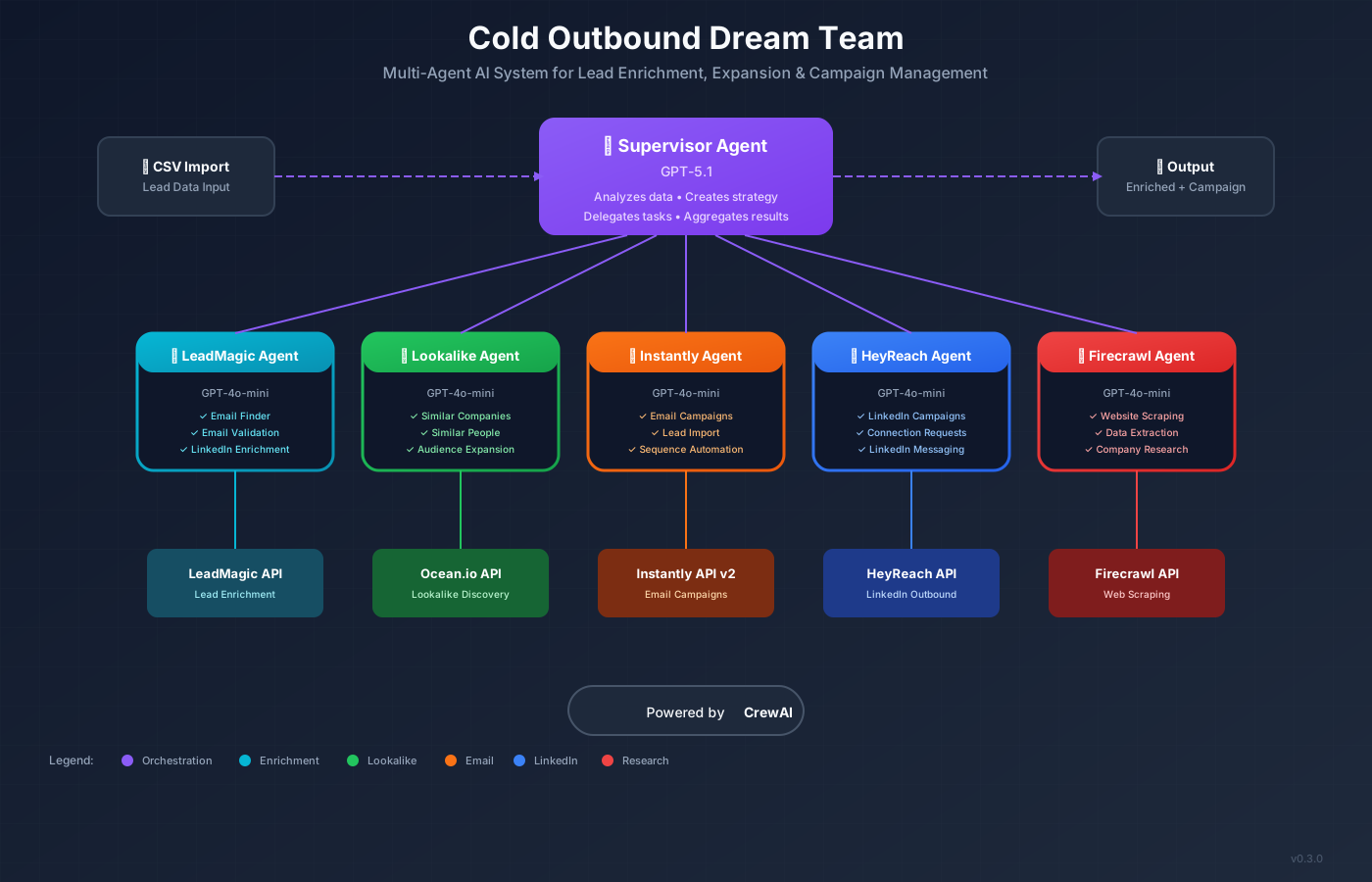
The Supervisor Agent (GPT-5.1) orchestrates specialized child agents (GPT-4o-mini) to enrich leads, expand audiences, and manage campaigns.
🚀 Getting Started (Beginner-Friendly Guide)
📋 Before You Start
You'll need a few things set up on your computer:
- ✓Python 3.10+ - The programming language this runs on. Download Python
- ✓Git - Version control to download the code. Download Git
- ✓Cursor IDE - An AI-powered code editor (highly recommended). Download Cursor
- ✓GitHub Account - Free account to copy the project. Sign up for GitHub
Fork the Repository
💡 What is "forking"?
Forking creates your own copy of the project in your GitHub account. Think of it like photocopying a recipe book - you get your own copy that you can modify without affecting the original.
- a.Go to github.com/bcharleson/cold-outbound-dream-team
- b.Click the "Fork" button in the top-right corner
- c.Select your account as the destination
- d.You now have your own copy at
github.com/YOUR-USERNAME/cold-outbound-dream-team
Clone to Your Computer
💡 What is "cloning"?
Cloning downloads your forked repository from GitHub (the cloud) to your local computer. It's like downloading a file, but it keeps a connection to GitHub so you can sync changes.
Open your terminal (or Cursor's built-in terminal) and run:
# Navigate to where you want to store the project
cd ~/Documents

# Clone YOUR forked repository (replace YOUR-USERNAME)
git clone https://github.com/YOUR-USERNAME/cold-outbound-dream-team.git

# Enter the project folder
cd cold-outbound-dream-teamOpen in Cursor IDE
Why Cursor? Cursor is an AI-powered code editor that can help you understand and modify code using natural language. It's perfect for this project because you can ask Cursor to explain any part of the code or help you customize it. Get Cursor free →
- a.Open Cursor IDE
- b.Click File → Open Folder
- c.Navigate to and select the
cold-outbound-dream-teamfolder
Install Dependencies
In Cursor's terminal (View → Terminal), run:
# Create a virtual environment (keeps packages isolated)
python -m venv venv

# Activate it (Mac/Linux)
source venv/bin/activate

# Activate it (Windows)
# venv\Scripts\activate

# Install required packages
pip install -r requirements.txtConfigure Your API Keys
Copy the example environment file and add your API keys:
# Copy the example file
cp .env.example .env

# Open .env in Cursor and add your API keys
⚠️ Important
You'll need API keys from each service. Scroll down to the "Required Services" section to sign up and get your keys.
Run the System!
Now you're ready to enrich your leads:
# Analyze a CSV of leads
python -m src.main analyze your_leads.csv

# Enrich leads with emails and contact info
python -m src.main enrich your_leads.csv

# Find lookalike companies
python -m src.main expand "stripe.com,shopify.com" --factor 20

# Check your API credit balances
python -m src.main credits
🔗 Required Services & API Keys
Sign up for these services to get your API keys. Our partner links support the project at no extra cost to you.
Instantly.ai
Partner LinkCold email platform for managing your outreach campaigns and email sequences.
HeyReach
Partner LinkLinkedIn automation platform for connection requests and messaging campaigns.
Ocean.io
Partner LinkLookalike audience discovery - find companies and people similar to your best customers.
LeadMagic
Lead enrichment API for finding verified emails, phones, and LinkedIn profiles.
Firecrawl
Web scraping API to gather company intelligence and personalization data.
OpenAI
GPT-5.1 powers the Supervisor agent, GPT-4o-mini handles the specialized child agents.
🏗️ How It Works
CSV Upload
Supervisor analyzes your lead data structure
Strategy
Supervisor creates an enrichment plan
Expansion
Lookalike Agent finds similar companies (optional)
Enrichment
LeadMagic Agent finds and validates emails
Research
Firecrawl Agent gathers company context
Campaign
Instantly Agent creates campaign and imports leads
Output
Enriched CSV ready for outreach!
Need a Cold Outbound Partner?
This is what we do — all day, every day. We build intelligent outbound systems that fill your pipeline with qualified opportunities. If you're looking for a partner to architect, manage, and scale your cold outbound operations, let's talk.
Free 30-minute strategy call • No obligation