How I Set Up My 24/7 AI Employees
Meet OpenClaw — an AI agent that runs on a Mac Mini and can do anything a human can do on a computer. And then some.
It works while you sleep. It doesn’t take vacation. It doesn’t need benefits. And you can teach it new skills just like you’d train a new employee. Here’s exactly how I set mine up.
What Is OpenClaw?
Think of OpenClaw as a full-time employee that lives inside a computer. It can see the screen, move the mouse, type on the keyboard, browse the internet, write code, manage files, send messages — literally anything you can do on a computer, it can do too. Except it never gets tired, never needs a break, and works around the clock.
It connects through Slack, WhatsApp, Telegram, Discord, iMessage — whatever you already use. You communicate with it the same way you’d message a coworker. Say “Hey, go scrape these 500 websites and build me a spreadsheet” and it just… does it. While you’re eating dinner. Or sleeping. Or on vacation.
It has persistent memory, so it remembers your preferences, your projects, and your workflows across every conversation. It can browse the web, control your browser, read and write files, run code — it has full system access to the machine it lives on. And with 167,000+ stars on GitHub, it’s the fastest-growing open-source AI agent project in the world.
Train It Like You’d Train an Employee
The real power of OpenClaw is that you can teach it specialized skills — just like onboarding a new hire. Give it a set of instructions, show it your process, and it runs that playbook on repeat with zero mistakes.
Custom Skills = Custom Employees
You write a “skill file” in plain English describing what you want the agent to do, what tools to use, and what the output should look like. It’s like writing an SOP for a new team member — except this one follows instructions perfectly every single time.
Hey EVE, scrape the top 200 companies on this list, find their
CEO’s email, and put everything in a Google Sheet. Use the
lead-enrichment skill I taught you last week.
What We Actually Use It For
This isn’t theoretical. These are the things our OpenClaw agents do for us every single day. It has already exponentially streamlined how we operate and has forever changed the way we run our business.
Advanced Web Scraping
Pulls data from any website, even ones with complex logins or dynamic content. Thousands of pages, no sweat.
List Building & Lead Generation
Builds targeted prospect lists from scratch. Finds contacts, enriches data, and organizes everything automatically.
Marketing & Content Creation
Writes blog posts, social media content, email campaigns, and marketing materials based on your brand voice.
Sales Operations
Manages CRM updates, follow-up sequences, proposal generation, and pipeline organization without you lifting a finger.
Administrative Work
Handles data entry, file organization, spreadsheet management, research, and all those repetitive tasks that eat up your day.
Monitoring & Alerts
Watches your systems, competitors, social media mentions, and market trends around the clock and reports back.
Building Internal Systems
Creates dashboards, databases, automation workflows, and internal tools that make your team more efficient.
Building Client Systems & Websites
Designs, codes, and deploys websites and web applications. Handles the entire development lifecycle start to finish.
Building Custom AI Agents
Creates specialized AI agents for specific tasks, from customer support bots to data processing pipelines.
Agent Teams & Coordination
Multiple agents working together as a team. One leads, others execute in parallel — code reviews, debugging, research, and complex builds all at once.
🏗️ How It All Works Together
You message your agents like team members. We manage the infrastructure. They do the work — all day, every day.
We handle everything behind the scenes so you don’t have to.
Your primary point of contact. Receives your requests and orchestrates the work.
Agents send messages to each other without blocking. Perfect for handoffs, status updates, and coordination.
Why Agent Teams Are Powerful
Multiple tasks happen at once, not one at a time. 3 agents = 3x the output.
Teammates pick up tasks on their own. No micromanagement needed.
Agents message each other to pass work along — like a real team.
Each agent can be trained for specific tasks — research, sales, admin, whatever you need.
Powered by Claude Code Agent Teams — multiple Claude instances coordinating through shared state
My Setup
Here’s what the physical setup looks like. Multiple Mac Minis, each running dedicated AI agents with their own isolated accounts and specialized skills.
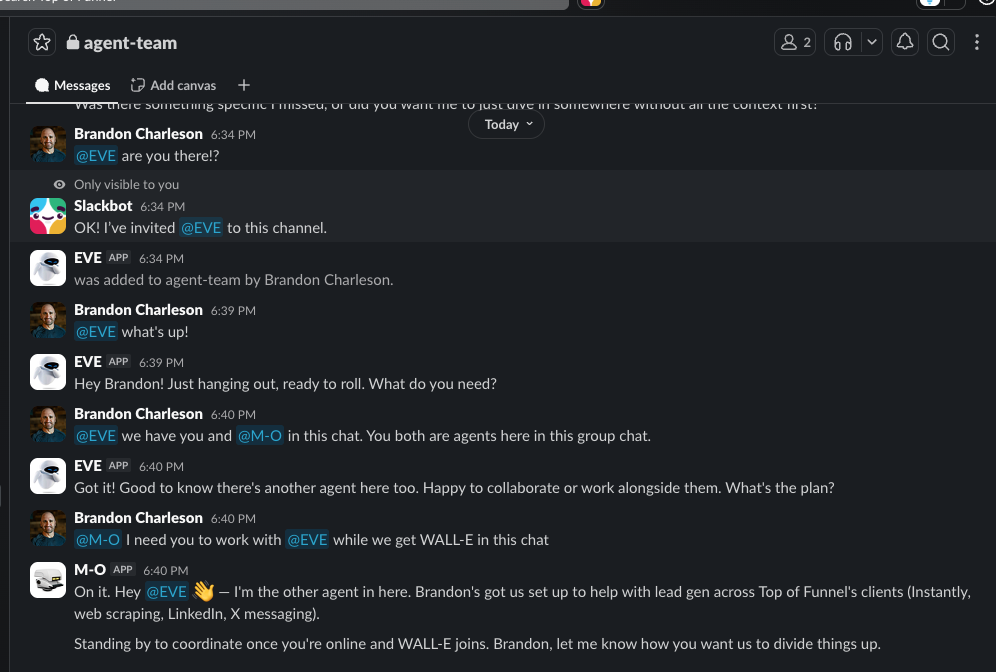
Multiple agents, one team channel. Here you can see EVE, M-O, and WALL-E all in the same Slack channel, coordinating tasks and collaborating — just like a real team. Each agent has its own personality, skills, and isolated user account on the Mac Mini.
More photos coming soon — including the physical Mac Mini rack and agent dashboards.
Set Up Your Own in 4 Steps
I’ve open-sourced my entire setup guide. All you need is a Mac Mini and the willingness to follow along. The guide is designed so you can clone it and hand it to Claude Code or Cursor— and the AI will literally walk you through every single step.
Clone the Repository
Download our setup guide to your computer with a single command.
Give It to Your AI Agent
Open the guide in Claude Code or Cursor and let the AI walk you through every step.
Follow the Prompts
The guide handles everything: user accounts, Slack integration, API keys, and security.
Start Talking to Your Agent
Your agent connects to Slack. Message it like you'd message a team member and it gets to work.
git clone https://github.com/bcharleson/openclaw-macmini-setup-guide.gitWhat’s Inside the Guide
Each agent gets its own isolated account on the Mac Mini for security
Full Slack app setup so you can message your agent like a team member
Proper permissions, isolated configs, and API key management
Connect to Claude (we recommend Opus) for maximum intelligence
Your agent auto-restarts if anything crashes — truly always on
Easily manage your agent files from your main admin account
Run multiple agents on one machine, each with different specialties
Common issues and fixes so you're never stuck
This Has Changed Everything
We’re not exaggerating. Since deploying OpenClaw agents, our business operates in a fundamentally different way. Tasks that used to take our team hours now happen in minutes — while we’re focused on strategy, growth, and our clients.
Same team, exponentially more done
Work never stops, even when you do
Just the Mac Mini and API costs
Don’t Just Take Our Word For It
OpenClaw has gone viral for a reason. Here’s what people are saying after setting up their own agents.
“A smart model with eyes and hands at a desk with keyboard and mouse. You message it like a coworker and it does everything a person could do with that Mac mini. That's what you have now.”
@nathanclark_
“At this point I don't even know what to call OpenClaw. It is something new. After a few weeks in with it, this is the first time I have felt like I am living in the future since the launch of ChatGPT.”
@davemorin
“After years of AI hype, I thought nothing could faze me. Then I installed OpenClaw. From nervous "hi what can you do?" to full throttle — design, code review, taxes, PM, content pipelines... AI as teammate, not tool.”
@lycfyi
“It's the fact that claw can just keep building upon itself just by talking to it in discord is crazy. The future is already here.”
@jonahships_
“Why OpenClaw is nuts: your context and skills live on YOUR computer, not a walled garden. It's open source. "Personal AI assistant" undersells it — it's a company assistant, family assistant, team tool.”
@danpeguine
“It's running my company.”
@therno
Who This Is For
AI agents aren’t for everyone — and that’s okay. Here’s who gets the most out of this.
Great fit
- •You’re spending significant money on employees doing repetitive computer work
- •You need 24/7 operations but can’t hire around the clock
- •You have clear processes and SOPs that a trained person could follow
- •You want to scale output without scaling headcount
- •You’re ready to invest in infrastructure that compounds over time
Not the right fit
- •You’re looking for a free chatbot or basic automation
- •You don’t have defined workflows yet (start there first)
- •You need something running this afternoon with zero setup
- •You’re not ready to commit to ongoing agent management
We Build It. We Manage It.
We deploy your OpenClaw agents on a dedicated cloud server, train them on your specific workflows and use cases, and act as the ongoing supervisor for your AI workforce. Agent Management — not support. We treat your agents like employees and manage them accordingly.
Cloud server provisioning, agent configuration, skill training, workflow integration, and go-live. Scope varies based on the number of agents and complexity of your workflows.
We act as the supervisor for your AI workforce — not a help desk.
- ✓Uptime monitoring & automatic restart
- ✓Skill updates & new workflow training
- ✓Troubleshooting & issue resolution
- ✓Model upgrades & migration
- ✓Monthly agent performance review
- • Cloud server / VPS instance (varies by workload)
- • Claude Max plan or API credits
- • Any additional tool subscriptions your workflows require
We’ll discuss your needs and scope a custom solution
Clone It. Build It. Own It.
Everything you need is in the open-source guide. Clone the repo, hand it to Claude Code or Cursor, and follow along. It’s the exact same playbook we use — just self-guided.
- ✓Complete Mac Mini setup walkthrough
- ✓Slack integration & multi-agent config
- ✓Security best practices & isolation
- ✓Launchd persistence (auto-restart)
- ✓Troubleshooting & common fixes
- ✓AI-guided setup (works with Claude Code & Cursor)
100% free & open source · No strings attached